
Accepting a Team Invitation to FastHire
Rakesh · August 4, 2026 · 2 min read
If a FastHire admin has invited you to their organization, you'll get a link to open — not an email from FastHire itself. Opening it takes you straight to a page where you set your name and password and join immediately, with no separate email confirmation step.
Step 1: Open your invite link
Your admin will send you a link that looks like app.thefasthire.com/invite/<token>, shared however they normally reach you — Slack, email, or another channel. FastHire doesn't send this link on its own, so it'll come directly from the person who invited you.
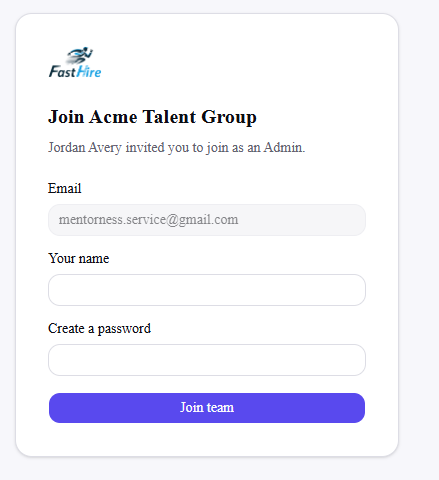
Opening it shows your organization's name, who invited you, and the role you're joining as (Admin or Recruiter).
Step 2: Set your name and password
Your email is already filled in from the invite and can't be changed here. Fill in:
Your name
A password — at least 8 characters, with at least one letter and one number
Then select Join team.
Step 3: You're in
FastHire creates your account, signs you in automatically, and takes you straight to the Searches page — there's nothing further to confirm. Your role (Admin or Recruiter) is whatever your admin chose when they invited you; if that's wrong, ask them to update it from Settings → Team after you've joined.
If something goes wrong
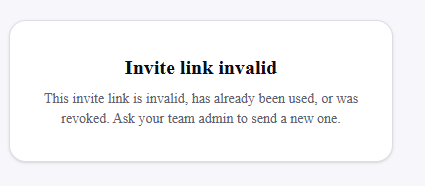
"Invite link invalid"
This means the link has already been used, was revoked by an admin, or never existed. Ask whoever invited you to send a fresh link from Settings → Team.
"An account with this email already exists"
You already have a FastHire account under this email address — from this organization or a different one. Use the Log in page instead of the invite link. If you believe this is wrong, check with the admin who invited you.
Frequently asked questions
Can I use the invite link more than once?
No — once you join, the link is marked as used. If you need access again later, ask an admin for a new invite.
Can I change my email address on the invite page?
No. The email is fixed to whatever address your admin invited. If it's the wrong address, ask them to revoke the invite and send a new one to the correct email.
Do I need to verify my email after joining?
No — accepting the invite signs you in immediately and takes you to the Searches page. There's no separate verification step.
What if I forget my password after joining?
Contact FastHire support — there's no self-serve password reset yet, and the invite link itself only works once, for initial setup, so it can't be reused to set a new password.