
Troubleshooting: Why Isn't My Sequence Sending?
Rakesh · August 5, 2026 · 4 min read
Start by checking whether the whole sequence is paused, then whether it's one specific candidate stalled for a normal reason (sending window, daily cap, already replied), and finally whether it's actually sending — some steps quietly simulate a send instead of really delivering one, and FastHire doesn't visually distinguish that case from a real send.
First: is the whole sequence paused?
Open the sequence from Outreach and check its status. FastHire automatically pauses an entire sequence (not just one candidate) when:
Its owner's LinkedIn connection is missing or expired and a LinkedIn step comes due
Its owner's connected email account (Google, Microsoft, or IMAP) has its authorization expire mid-run
Your organization has run out of trial credits and a candidate is about to be contacted for the first time
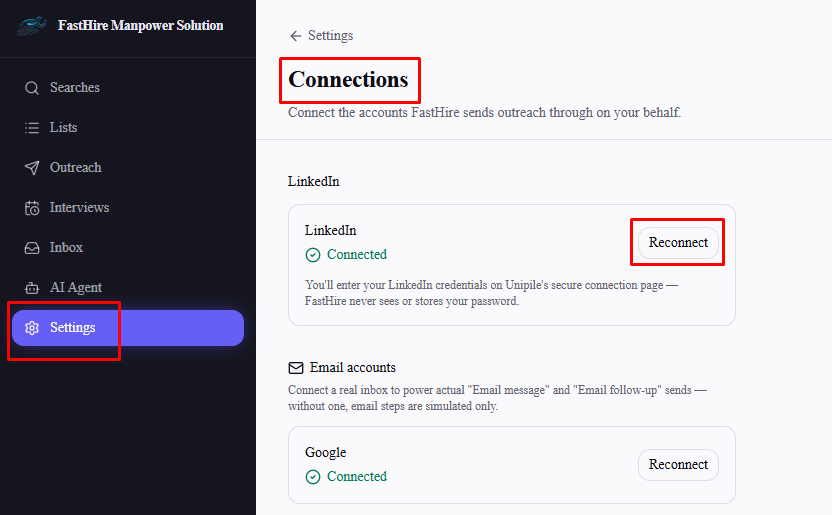
Fix the underlying issue (reconnect the account in Settings → Connections, or upgrade your plan in Settings → Billing), then manually switch the sequence back to Active — it doesn't resume itself once the problem is fixed.
Second: is it one candidate, not the whole sequence?
These delay an individual candidate's next step without pausing anyone else:
Outside your sending window — waits until the window next opens.
Daily cap already used — waits until tomorrow's window opens (see "How Daily Sending Limits Work").
They already replied — this is expected, not a bug. A reply stops that candidate's sequence permanently, checked fresh right before every step fires, even for steps that don't explicitly wait for a reply.
LinkedIn rate-limited — retries automatically about an hour later.
An unexpected send error — retries automatically about 15 minutes later.
Third — and easy to miss: it might say "sent" without really sending
Some steps are recorded as sent in FastHire without a real message actually going out, and there's no visual difference in the sequence history between these and a genuine send:
WhatsApp follow-up steps never really send. WhatsApp follow-up steps never really send. WhatsApp's Business API only allows pre-approved message templates for outreach it initiates, not freely AI-written text — so this step is always simulated, regardless of your setup. WhatsApp is also currently hidden from the sequence builder entirely, so this only applies to older sequences that already had the step before it was paused; you can't add it to a new one. Treat it as a placeholder, not a live channel, until FastHire adds real WhatsApp template support.
Email steps simulate if there's no connected inbox, or the candidate has no known email address. A real send needs both a connected Google/Microsoft/IMAP account and a candidate email on file — missing either one, the step is logged as sent but nothing goes out.
LinkedIn steps simulate for candidates imported from a CSV/Excel file rather than sourced through a search, since they don't carry a real LinkedIn profile ID for FastHire to message.
If a whole channel across a sequence seems to be going nowhere despite showing as sent, check whether it falls into one of these three cases before assuming something's broken.
Frequently asked questions
How do I know if my LinkedIn or email connection has actually expired?
Check Settings → Connections — an expired connection is flagged there, and reconnecting it is the fix for a sequence paused for that reason.
Does a paused sequence lose the candidates already in progress?
No — pausing just stops new steps from firing. Candidates keep their current position and pick back up once you reactivate the sequence.
My sequence shows messages as sent, but the candidate says they never got anything — why?
Check whether the step in question was a WhatsApp follow-up, an email to a candidate with no known address (or no connected inbox), or a LinkedIn step to a CSV-imported candidate — all three log as sent without a real delivery.
Why did my sequence pause right when I was about to run out of trial credits?
Credits are only checked the moment a candidate would be contacted for the first time — if none are left, the whole sequence pauses there rather than contacting some candidates and silently skipping others.