
Understanding Your Recruiting Funnel Analytics
Rakesh · August 5, 2026 · 5 min read
Analytics gives you a cohort-based recruiting funnel, outreach channel performance, interview show rates, per-recruiter activity, and credit cost efficiency — all for your current billing period by default. It's purely informational; nothing here affects your billing or usage limits.
Where to find it
Go to Settings → Analytics. Only Org Admins can access this page.
The recruiting funnel
Six stages: Sourced → Added to list → Contacted → Replied → Interview scheduled → Interview completed, each shown with its count, percentage of the original sourced count, and percentage of the previous stage.
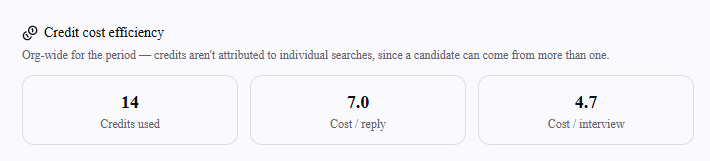
You can also widen the view beyond the current billing period: use the From/To date fields above the funnel to pick any custom range, then select Apply. Select Reset to current period to return to the default. Note that Credits used, in the Credit cost efficiency section, always reflects your current billing period regardless of the date range selected here — it's tied to billing, not the analytics view.
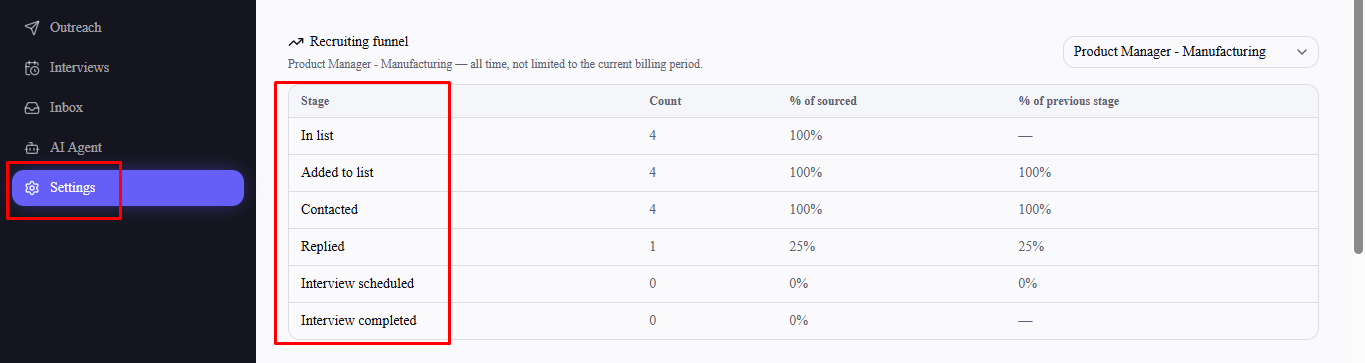
By default, the funnel tracks a true cohort: candidates first sourced during the current billing period, followed all the way through — regardless of when they actually reached a later stage. That's different from just counting each stage's activity within the period, which could otherwise let candidates sourced earlier inflate a later stage.
Use the list filter to instead see the funnel for one specific list — that view covers all time, not just the current period, since a single role's list is expected to run longer than one 30-day billing cycle.
Outreach channel performance
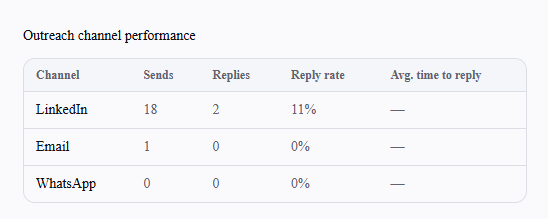
Sends, replies, reply rate, and average time to first reply, broken out by LinkedIn, Email, and WhatsApp, for the current billing period.
Interview scheduling and show rate
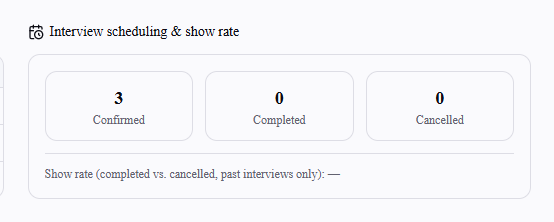
Confirmed, Completed, and Cancelled interview counts, plus a show rate — completed vs. cancelled, counted only among interviews whose scheduled time has already passed. An upcoming interview that hasn't happened yet isn't counted as a no-show either way until its time passes.
Recruiter activity
Sends, responses, and response rate broken out per recruiter, for the current billing period.

Credit cost efficiency
Credits used, cost per reply, and cost per interview — calculated org-wide for the period rather than per search, since a single candidate can come from more than one search.
Frequently asked questions
Does anything on this page affect my billing or usage limits?
No — it's explicitly informational only, with no effect on your plan, credits, or limits.
Can Recruiters see the Analytics page?
No — it's Org Admin only.
Why does the list-filtered funnel cover all time, but the default view doesn't?
The default org-wide funnel is scoped to the current billing period so it lines up with the rest of the page's numbers. A single list is expected to span multiple billing periods, so filtering to one switches to an all-time view instead.
Why doesn't an upcoming confirmed interview count toward the show rate?
Show rate only measures interviews whose scheduled time has already passed — counting a still-upcoming interview either way would misrepresent it as a no-show or a completed show before it's actually happened.