
Removing or Deactivating a Team Member
Rakesh · August 5, 2026 · 3 min read
Removing someone deactivates their login and frees up their seat — it doesn't delete their account or anything they built. But it also doesn't touch anything already in motion: if they own an active outreach sequence, it keeps sending through their connections even after they're removed.
How to remove someone
Go to Settings → Team and select the × next to their name. Only Org Admins can do this.
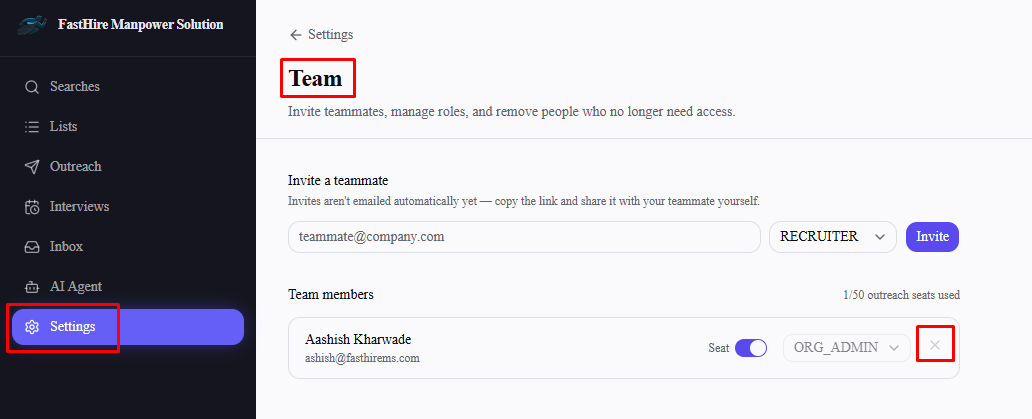
What happens immediately
They can no longer log in.
They disappear from the Team members list.
Their outreach seat is freed automatically — it counts against your seat limit only while they're active, so you don't need to separately turn their seat off first.
What doesn't happen automatically
Removing someone doesn't delete or hide anything they created — their searches, lists, and sequences remain fully intact and usable by the rest of your team, exactly as before.
More importantly: if they own an active outreach sequence, it keeps running. Removal only deactivates their login — it doesn't touch their LinkedIn or email connections or pause anything sending through them. If you want their outreach to actually stop, pause their sequences yourself (from each sequence's results page) before or immediately after removing them.
You can't remove your only Admin
If someone is the sole remaining Org Admin, the remove button is disabled for them — promote someone else to Admin first if you need to remove them.
Frequently asked questions
Does removing someone delete their searches, lists, or candidates?
No — everything they built stays exactly as it was, visible and usable by the rest of the team.
Do their active sequences stop sending once they're removed?
No — sequences keep running through the removed person's connections until you manually pause them. This isn't automatic.
Can I bring someone back after removing them?
Yes — go to Settings → Team and invite them again using the same email address. Since they still have an account, this reactivates it directly (with their previous role, and their outreach seat off by default) instead of sending a new invite to accept. You don't need to contact support.
Does removing the only Admin work if I promote someone else first?
Yes — once another active Admin exists, the original Admin's remove and demote controls become available.