
Setting Up Automatic Interview Reminders (Email)
Rakesh · August 5, 2026 · 3 min read
Interview reminders send automatically 1 hour before a confirmed interview, by email, through each recruiter's own connected inbox.
WhatsApp interview reminders are temporarily paused product-wide — see "How WhatsApp Works on FastHire" — so the setting described below only covers email.
Where to turn them on
Go to Settings → Interview reminders. Only Org Admins can access this page.
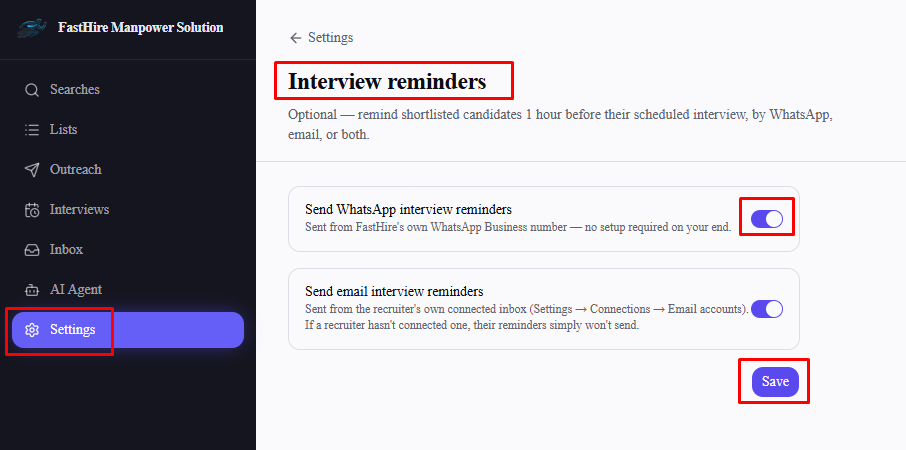
Email reminders
Turning on "Send email interview reminders" is only half the setup. Email reminders send through each recruiter's own connected inbox (Settings → Connections → Email accounts) — if a recruiter hasn't connected one, their candidates simply won't get an email reminder, silently, with no error shown anywhere. Make sure every recruiter who schedules interviews has connected an email account.
What triggers a reminder
Sends exactly once, 1 hour before the interview's scheduled time
Only for interviews with Confirmed status — cancelled interviews never get one
Needs the candidate's email address on file
Includes the meeting link if one exists, or a note that the recruiter will share it shortly if it doesn't
Frequently asked questions
If I turn on email reminders, do they work for my whole team immediately? Only for recruiters who already have their own email account connected.
Can a Recruiter (non-Admin) turn these settings on? No — Settings → Interview reminders is Org Admin only.
What happened to WhatsApp reminders? They're temporarily paused across the product — see "How WhatsApp Works on FastHire."