
Redeeming a Referral Code from Billing Settings
Rakesh · August 5, 2026 · 4 min read
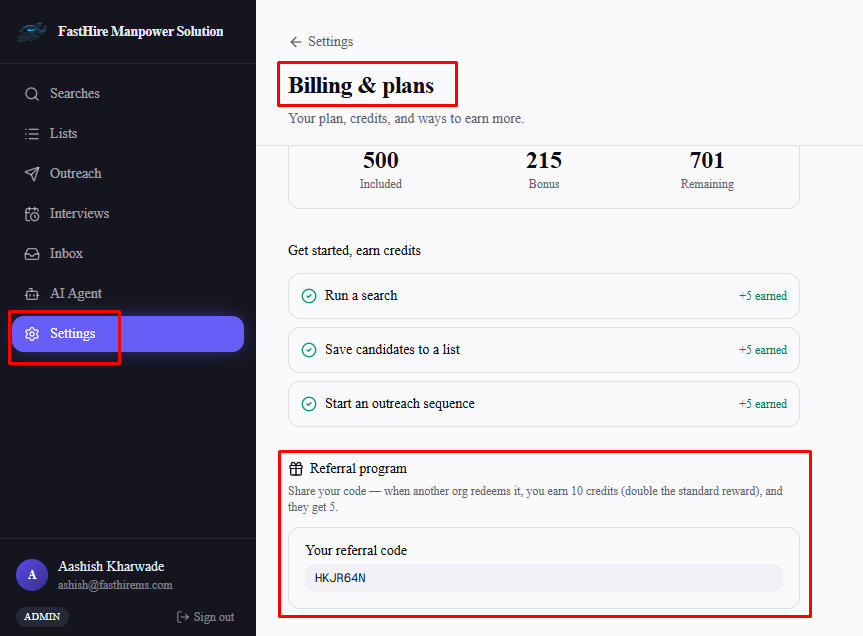
You can't redeem a referral code from Settings → Billing — that option was deliberately removed and moved into the signup wizard instead, since a code is only ever useful before your organization exists. What Settings → Billing still shows is your own referral code, for sharing with others.
Where redemption actually happens
Referral codes can only be redeemed once, on the "Tell us about you" step of signup. See "How to Redeem a Referral Code on FastHire" for that walkthrough — there's no equivalent option anywhere in Settings once your organization already exists.
What Settings → Billing does show
Under the Referral program section, you'll find your own code — the one to share with people you refer to FastHire, not a field for entering someone else's.
Frequently asked questions
I missed entering a referral code during signup — can I add one now?
No — redemption only happens once, during signup. There's no way to redeem one afterward from Settings or anywhere else.
Why does Billing show a referral code field if I can't use it to redeem one?
That field is your own code for sharing, not a redemption box — the labeling can be easy to misread if you're expecting to enter someone else's code there.
Did this used to work differently?
Yes — redemption briefly lived in Settings → Billing before being moved to signup-only, since it only ever made sense as a one-time action before your organization had already been credited its own referral relationship.