
How to Complete Your FastHire Onboarding Checklist?
Rakesh · August 4, 2026 · 3 min read
FastHire rewards you with bonus contact credits for completing three setup tasks — running a search, saving candidates to a list, and starting an outreach sequence. This guide shows where to find the checklist, what each task requires, and where the credits you earn show up.
Where to find the onboarding checklist
Go to Settings → Billing. The checklist appears under the heading "Get started, earn credits," below your plan and contact-credit summary.
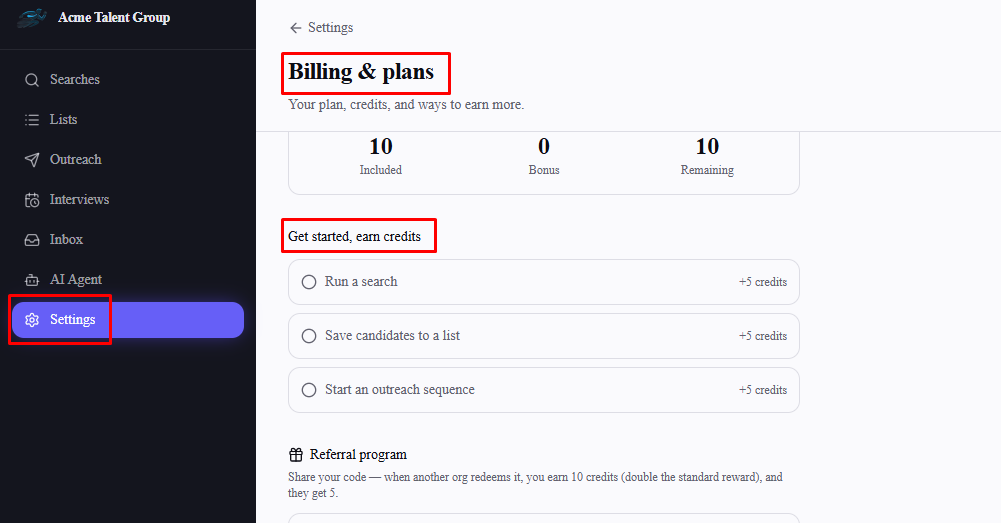
The three checklist tasks
Run a search — 5 bonus credits
Save candidates to a list — 5 bonus credits
Start an outreach sequence — 5 bonus credits
That's up to 15 bonus credits total, on top of whatever your plan already includes.
How tasks get marked complete
There's nothing to click or check off manually. Each task is marked complete automatically the moment you actually do the underlying action anywhere else in FastHire:
Run a search completes as soon as you've created at least one search
Save candidates to a list completes as soon as you've added at least one candidate to any list
Start an outreach sequence completes as soon as you've created at least one sequence
A gray circle next to a task means it's not done yet; a checkmark means it's complete. FastHire checks your account for newly completed tasks every time you visit the Billing page, so if you just finished a task elsewhere, open Settings → Billing to see it update and the credits get added.
Where the credits show up
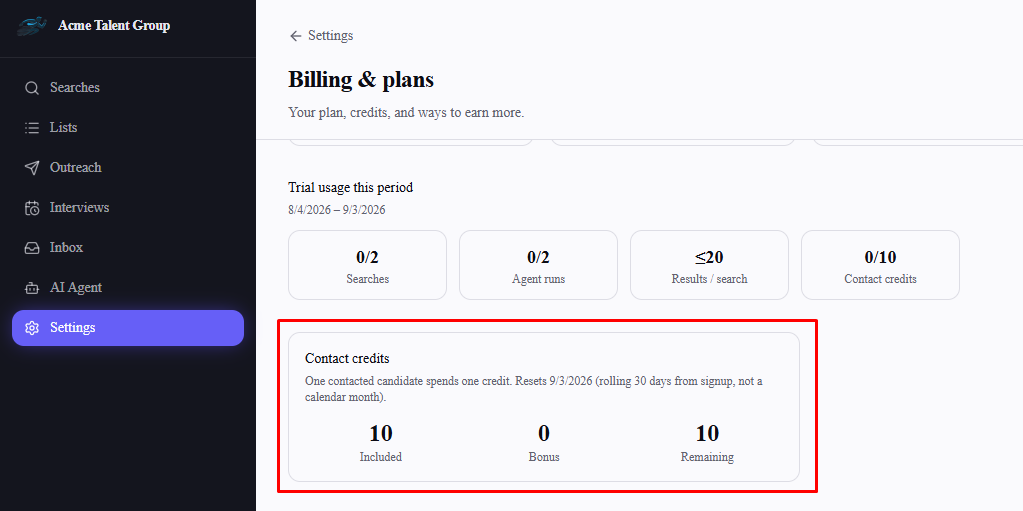
Once a task is awarded, its row switches from "+5 credits" to "+5 earned" in green. The credits themselves are added to the Bonus figure in the Contact credits section further up the same page, alongside your plan's Included and Remaining totals.
Frequently asked questions
Can I complete these tasks in any order?
Yes — the three tasks don't depend on each other and can be completed in any order.
Do the credits expire?
No. Bonus credits from the checklist are added on top of your plan's regular credit allowance and don't disappear when your billing period resets — only your plan's included credits reset each period.
I completed a task but it still shows as not done — why?
Checklist status updates when you load the Billing page, not instantly in the background. Refresh or revisit Settings → Billing after completing a task to see it marked done and the credits applied.
Can I earn the same task's credits twice?
No. Each task pays out once per organization, even if you later delete the search, list, or sequence that completed it.
Is this the same as the referral program?
No — the onboarding checklist and the referral program are separate ways to earn bonus credits. The referral program is further down the same Billing page and rewards you for inviting other organizations to FastHire.