
How to Redeem a Referral Code on FastHire
Rakesh · August 4, 2026 · 2 min read
A referral code can only be redeemed once, and only during signup — there's no way to redeem one after your organization already exists. Enter it on the "Tell us about you" step of the signup wizard to link your organization to the person who referred you. Redeeming a code doesn't add credits to your own organization — the reward goes entirely to the person who shared it with you: they get 30 bonus credits as soon as you sign up, and another 270 (300 total) once your organization converts to a paid plan.
Before you start
You'll need a referral code from someone already using FastHire — ask them for it, or use one you've been given directly. Codes come from an existing organization's own Settings → Billing page, so if you don't have one, there's nothing to redeem yet.
Step 1: Enter the code during signup
On the second screen of signup — "Tell us about you" (step 1 of 8) — you'll see an optional Referral code field below "How did you hear about FastHire?". Enter the code there.
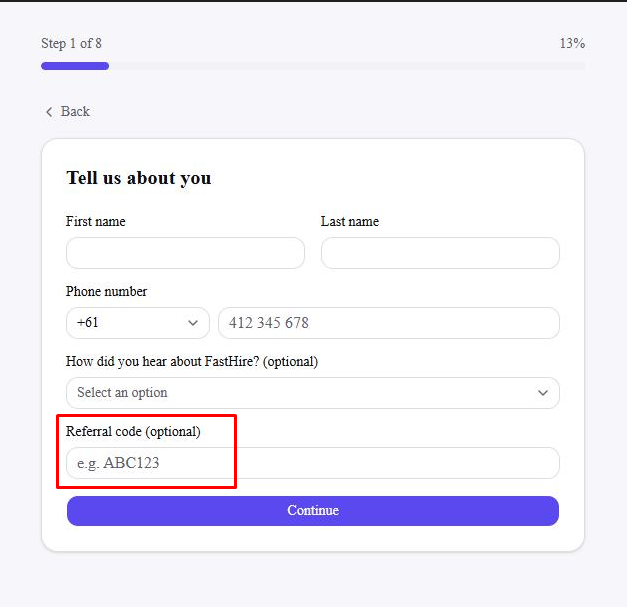
Codes aren't case-sensitive and extra spaces are trimmed automatically, so it doesn't matter how it was shared with you.
Step 2: Continue signup
Select Continue. If the code is valid, it's redeemed immediately — you'll see no separate confirmation step, and signup continues normally to the next screen. The referer gets 30 credits when the user signsup and 270 credits when the user goes ahead with paid plan with FastHire.
If the code doesn't work
An invalid code shows an inline error under the field and stops you from continuing until you fix or clear it. You'll see one of:
"You can't redeem your own referral code" — you entered your own organization's code instead of someone else's
"You've already redeemed a referral code" — your organization already redeemed a code earlier in this same signup, and can't redeem a second one
"That referral code doesn't match any organization" — double-check the code with whoever shared it; a typo is the most common cause
If you'd rather skip it, just leave the field blank and continue — you can't add a code later.
Frequently asked questions
Can I redeem a referral code after I've already signed up?
No. Redemption only happens on the Personal details step of signup. Once your organization exists, there's no redeem option anywhere in Settings.
How many credits do I get?
Redeeming a code doesn't add credits to your organization — it only records that you were referred. The referrer gets 30 credits immediately when you sign up, and 270 more (300 total) once your organization upgrades to a paid plan.
Can I redeem more than one referral code?
No — each organization can redeem exactly one referral code, ever.
Where do I find my own referral code to share with others?
Once you're signed up, go to Settings → Billing and look for the Referral program section — your code is shown there, ready to copy and share.
Does my organization get anything for redeeming a code?
No — only the person who shared the code with you is rewarded. Redeeming it costs you nothing and gives you no penalty either; it's simply how you credit whoever referred you.