
Troubleshooting Integration Connection Errors
Rakesh · August 5, 2026 · 3 min read
In practice, a FastHire connection only ever shows one of two states: Connected or Reconnect needed. The Connections page also defines a "Connection error" style, but nothing in FastHire actually triggers it — if something's wrong, you'll see "Reconnect needed," not a distinct error state.
"Reconnect needed" (expired connection)
This appears automatically the moment FastHire tries to use a connection and gets an authentication failure — a revoked LinkedIn session, an expired OAuth token, changed credentials, and similar. It applies to LinkedIn, email (Gmail/Microsoft/IMAP), and Google Calendar connections alike.
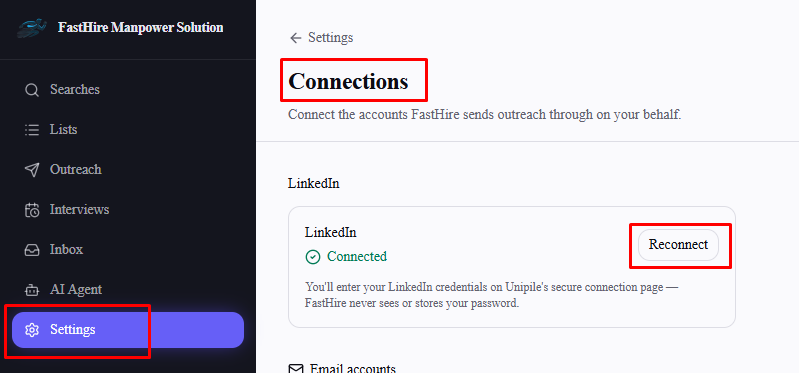
Fix: go to Settings → Connections and select Reconnect on the affected connection — it's the same flow as connecting for the first time.
Downstream effects of an expired connection
An expired LinkedIn or email connection doesn't just fail one send — it pauses the entire outreach sequence relying on it, rather than retrying forever or silently skipping candidates. Reconnecting fixes the underlying problem, but the sequence itself doesn't resume automatically — you still need to switch it back to Active from the sequence's results page.
Rate limiting isn't a connection problem
If LinkedIn temporarily rate-limits your account, FastHire automatically retries about an hour later — the connection itself stays "Connected," and there's nothing to reconnect. Reconnecting won't speed this up.
"The connection didn't complete" during setup
This appears right after trying to connect Google Calendar or Calendly, if the OAuth flow doesn't finish successfully — usually from cancelling Google/Calendly's consent screen, closing the tab partway through, or taking too long (the connection attempt expires after about 10 minutes). Just select Connect again and go through the flow without interruption.
A failed IMAP/SMTP test shows the real reason
When "Test & connect" fails for a Microsoft or IMAP/other email account, FastHire shows the mail server's actual rejection message — for example, "Invalid credentials," a requirement to use an app-specific password, or a wrong host/port — rather than a generic "connection failed." Use that message to fix the specific field it points to and try again; nothing is saved until the test succeeds.
Looks connected, but isn't
The signup wizard's "Connect your calendar" step can leave behind a connection that looks present but has no real access token — see "Connecting Google Calendar for Interview Scheduling" for how to confirm and fix this specific case.
Frequently asked questions
Why do I only see "Reconnect needed" and never "Connection error"?
That's expected — "Connection error" is defined in the UI but no current code path ever produces it. Any real problem shows as "Reconnect needed" instead.
Do I lose my sequence progress or history when a connection expires?
No — expiring only pauses future sends. Candidates keep their current position in the sequence and pick up again once you reconnect and reactivate it.
Does reconnecting automatically restart anything that was paused?
No — reconnecting only fixes the connection itself. Go back to each paused sequence and switch it to Active manually.
I reconnected but I'm still getting errors — what now?
Double-check you completed the full hosted login or OAuth flow without cancelling partway, and that you're reconnecting the account FastHire actually needs (the same LinkedIn/email/Google account your outreach is supposed to use). If it still fails, contact FastHire support.