
How Daily Sending Limits Work on FastHire
Rakesh · August 5, 2026 · 3 min read
FastHire enforces two daily caps per recruiter — one for LinkedIn connection requests, one for messages — and a sending window with a timezone. Anything over the cap or outside the window isn't dropped; it's simply delayed until the next window opens.
Where to configure them
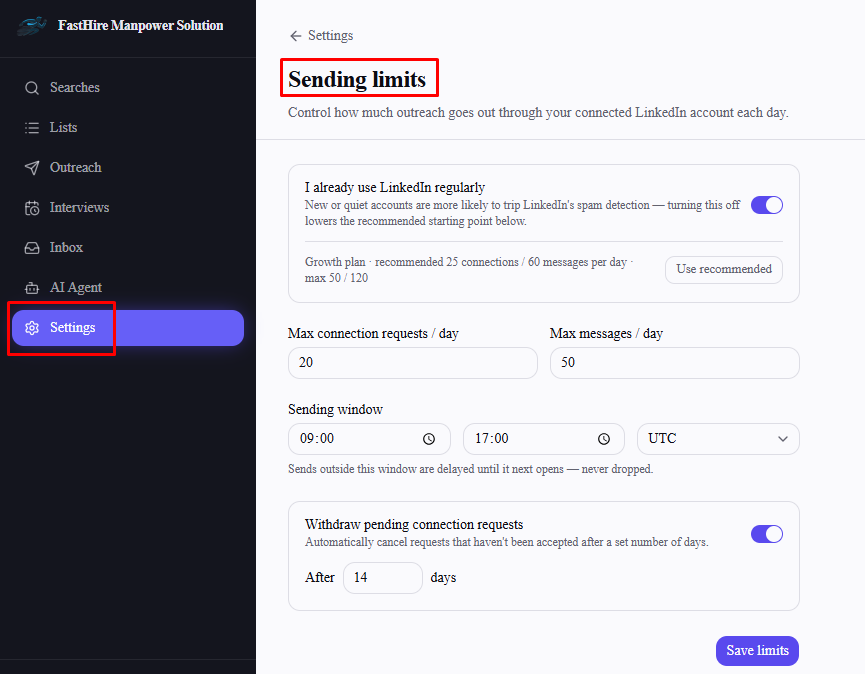
Go to Settings → Sending limits. You'll need a connected LinkedIn account first — without one, the page just prompts you to connect it, since limits are stored against that connection.
The two caps
Max connection requests / day — applies only to LinkedIn connection request steps.
Max messages / day — this one is shared across every other send: LinkedIn messages and follow-ups, email messages and follow-ups, and WhatsApp follow-ups all draw from this same single daily count. It isn't a separate cap per channel.
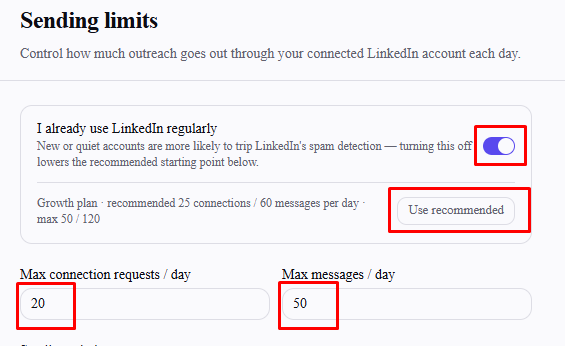
Both caps scale with your plan — Starter, Growth, and Enterprise each have their own recommended starting point and hard maximum, shown on the page. Turning off "I already use LinkedIn regularly" lowers the recommended starting values (new or quiet LinkedIn accounts are more likely to trip LinkedIn's own spam detection) — it doesn't change the maximum you're allowed to set, only what's suggested. Select Use recommended to apply the suggested numbers directly.
Sending window and timezone
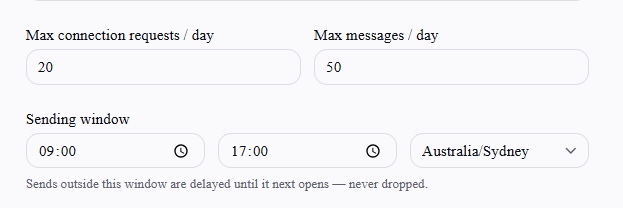
Set a start time, end time, and timezone. Sends scheduled outside this window wait until it next opens rather than going out immediately or being skipped.
What happens when you hit the cap
Once either cap is reached for the day, remaining sends for that channel type wait until tomorrow's sending window opens — they aren't lost, failed, or skipped permanently, just rescheduled.
Withdrawing stale connection requests
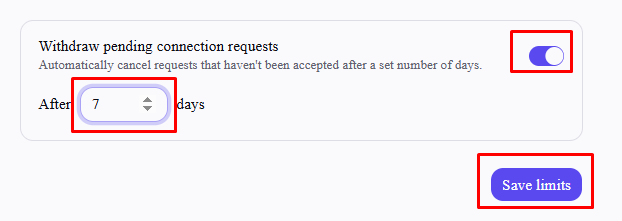
Turn on "Withdraw pending connection requests" to automatically cancel LinkedIn requests that haven't been accepted after a set number of days, freeing you from manually cleaning up old pending invites.
Frequently asked questions
Are these limits shared across my whole team, or set per person?
Per person — each recruiter's limits are tied to their own connected LinkedIn account, not a shared org-wide setting.
What limits apply if I haven't set any?
A default of 20 connection requests and 50 messages per day, with a 9am–5pm UTC sending window, until you configure your own.
Can I set my cap higher than my plan allows?
No — each field has a hard maximum tied to your plan tier, shown next to the recommended value.
Does exceeding the cap cause a send to fail?
No — it's rescheduled for the next available window, not treated as an error.
Do email sends count against the connection-request cap?
No — only LinkedIn connection request steps count there. Email, along with LinkedIn and WhatsApp messages/follow-ups, all count against the messages cap instead.