
How to Use the FastHire Unified Inbox
Rakesh · August 5, 2026 · 3 min read
Inbox brings every candidate reply — LinkedIn, email, and WhatsApp — into one place, searchable and filterable, with the full conversation history and links back to the sequence or search that sourced the candidate. You can reply directly to LinkedIn and email conversations from here.
Finding a conversation
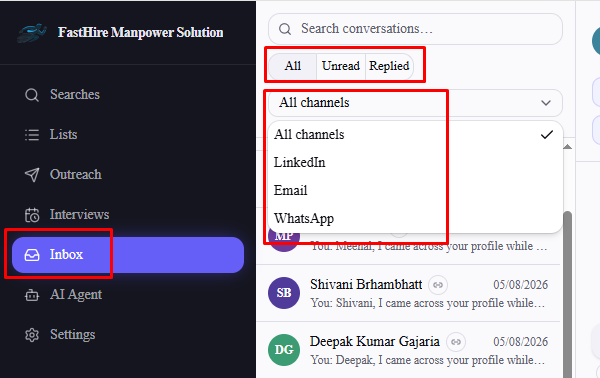
Go to Inbox. The list on the left shows every candidate who's messaged you, with:
Search by candidate name
All / Unread / Replied filter
Channel filter — All, LinkedIn, or Email (older WhatsApp conversations still appear under "All channels" and keep their channel badge, but WhatsApp isn't a selectable filter option).
Each conversation shows an icon for every channel actually used with that candidate (not just the most recent one), so a candidate you've reached on both LinkedIn and email shows both badges.
Reading a conversation
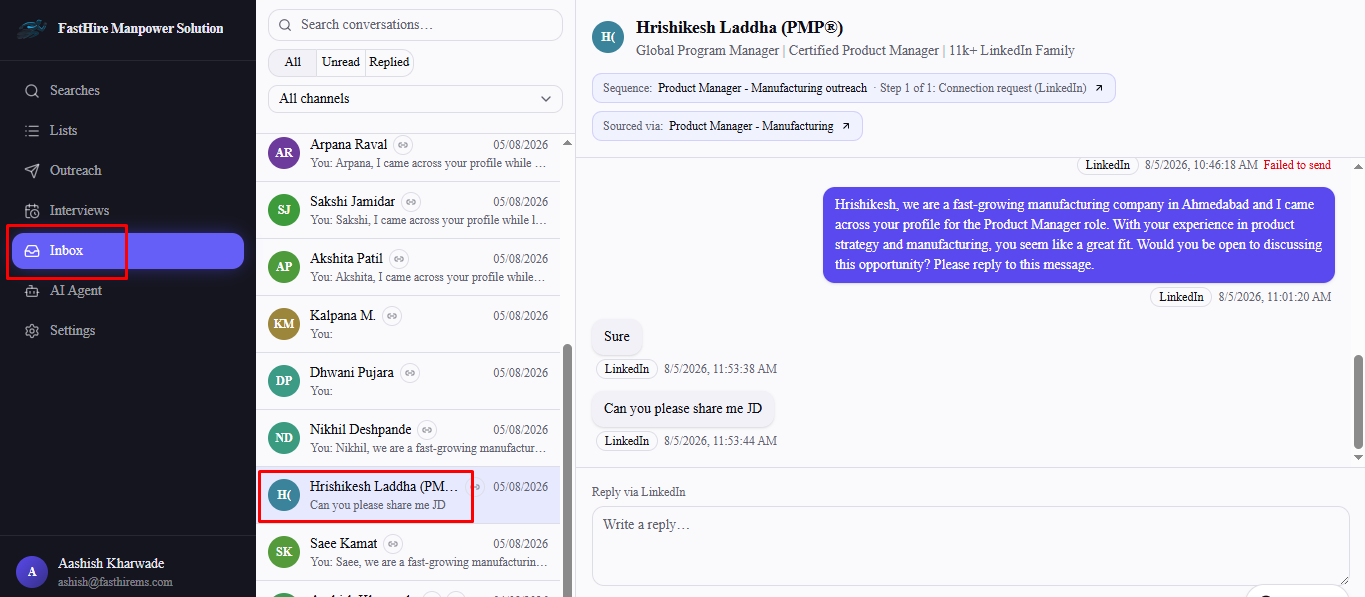
Select any conversation to open its full thread — your messages on the right, the candidate's on the left, each tagged with its channel and timestamp. Opening a conversation automatically marks its messages read; there's no separate "mark as read" action. If the candidate came from a sequence or a search, a badge at the top links straight back to it, and selecting the candidate's name opens their full profile (headline, location, skills, experience, education).
Replying
A reply box appears once the candidate has messaged you — you can't start a new conversation from Inbox, only reply to one that already has an inbound message. Replying is only available for LinkedIn and email conversations; WhatsApp conversations show full message history but have no reply option in Inbox.
Interested candidates
When FastHire's AI detects that a candidate is genuinely interested in the role, it automatically asks them for nine standard details — resume, contact number, total experience, current salary, expected salary, notice period, educational qualification, interview availability, and location — across one or more replies. A conversation with an interested candidate shows an Interested badge in the list and an expandable details panel at the top of the thread, labeled "Awaiting details" until every field comes back, then "Details complete." A resume sent as a file attachment is downloaded automatically and shown as a link. Use the Download interested candidates button above the conversation list to export everyone who's reached this stage, with their details, to Excel.
Messages sent outside FastHire also show up here
If you (or the candidate) send a LinkedIn message directly inside LinkedIn's own app instead of through FastHire, it still syncs into this thread — Inbox reflects the real conversation regardless of where a message was sent from.
Frequently asked questions
Can I reply to a WhatsApp conversation from Inbox?
No — WhatsApp messages show up in Inbox for you to read, but there's no reply composer for that channel. This matches the fact that outbound WhatsApp sends in sequences are also limited (see "Why Isn't My Sequence Sending?" for why).
Why isn't there a reply box on some conversations?
Either the candidate hasn't messaged you yet (there's nothing to reply into), or the most recent inbound message came via WhatsApp.
Can my teammates see conversations I'm having with candidates?
Yes — Inbox is shared across your organization, not private to whoever's outreach generated the reply.
Does replying from Inbox affect the candidate's sequence?
A candidate's reply already stops their sequence the moment it arrives, regardless of whether or when you reply — replying from Inbox is just how you continue the conversation, not something that changes their sequence status.