
Understanding Sequence Seats and Activation Limits
Rakesh · August 5, 2026 · 3 min read
A "seat" determines whether a specific team member can activate outreach sequences — it's separate from their role (Admin or Recruiter) and separate from contact credits. Your organization has a fixed number of seats; an Org Admin assigns them to whichever people actually need to send outreach.
Where to manage seats
Go to Settings → Team. Each team member has a Seat toggle, and the section header shows "X/Y outreach seats used." Only Org Admins can see and change this — Recruiters don't have access to Settings → Team at all.
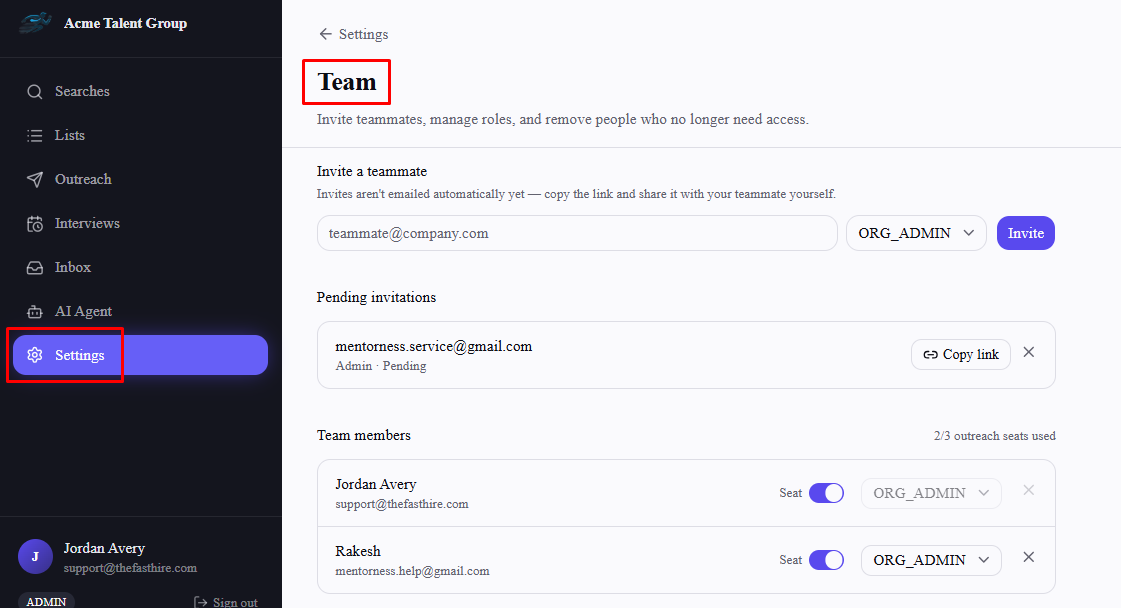
Turning a seat on for someone new is blocked once you're at your seat limit — turn off someone else's seat first if you need to reassign it.
What a seat actually gates
A seat doesn't affect sourcing, searches, or lists — anyone can do that regardless of seat status. It specifically gates activating an outreach sequence. If the person setting up a sequence doesn't have a seat enabled, they can still build and save it as a draft, but Activate sequence is blocked until an admin turns their seat on.
Seat limits aren't automatically tied to your plan yet
Plan comparison pages describe seat counts per tier (e.g. "Up to 3 recruiter seats" on Starter), but as it stands, your organization's seat limit is a fixed number that isn't automatically raised the moment you upgrade — if you've upgraded and still can't add another seat, contact FastHire support rather than assuming it self-adjusted.
Frequently asked questions
Does removing a teammate free up their seat automatically?
Yes — once someone is removed from Settings → Team, they're excluded from the seat count entirely, even if their seat toggle was left on. You don't need to turn their seat off first.
Do Admins need a seat too, or just Recruiters?
Seats apply to anyone activating a sequence, regardless of role — an Admin who wants to send outreach themselves needs a seat enabled just like a Recruiter would.
What happens to an already-active sequence if I turn off the owner's seat?
The seat check only applies at the moment of activation — turning off someone's seat afterward doesn't retroactively pause sequences they already activated.
Can I see how many seats I have without going to Settings → Team?
Not currently — the seat count and toggles are only shown there.