
How Currency-Based Pricing Works on FastHire
Rakesh · August 5, 2026 · 3 min read
FastHire displays plan prices in one of six currencies based on your company's country — but you're always actually billed in USD. The other currencies are illustrative conversions for readability, not separate real billing currencies.
Supported display currencies
USD ($)
EUR (€)
GBP (£)
AUD (AUD$)
CAD (CAD$)
INR (₹)
How your currency is chosen
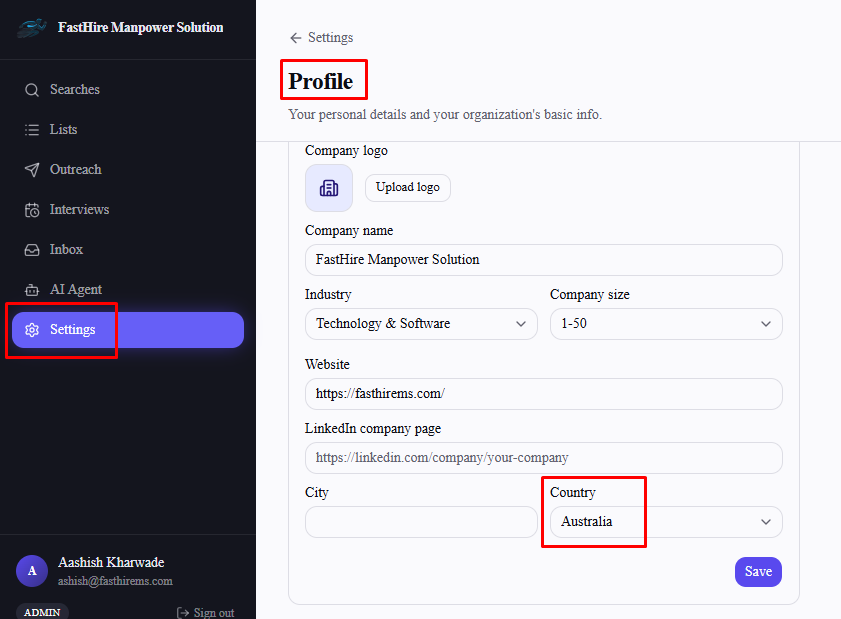
It's derived automatically from your company's country, set in Settings → Profile → Company info (Org Admin only editable) — there's no separate currency picker anywhere in Billing.
GBP — United Kingdom
AUD — Australia
CAD — Canada
INR — India
EUR — Ireland, Germany, France, Netherlands, Spain, Italy, Finland, Belgium, Austria, Portugal
Every other country falls back to USD display — including countries near a supported one. New Zealand, for example, isn't shown in AUD just because it's close to Australia; only a country whose own real currency is on the supported list gets mapped.
What's actually billed
Regardless of which currency is displayed on the pricing/billing pages, your actual charge is always processed in USD. Changing your company's country changes what you see, not what you're charged.
Frequently asked questions
Can I pick my display currency directly instead of through my company's country?
No — there's no standalone currency setting. It's always derived from the country in Settings → Profile → Company info.
If I change my company's country, does my actual bill change?
No — only the displayed price changes. Real billing stays in USD either way.
My country isn't in the supported list — what will I see?
Prices shown in USD, the same default used for every country not explicitly mapped to one of the other five currencies.
Why isn't my country's actual currency supported even though a similar one is?
FastHire only supports a fixed set of six currencies today. If your local currency isn't one of them, USD is used for display instead.