
Connecting Microsoft Email or IMAP to FastHire
Rakesh · August 5, 2026 · 3 min read
Microsoft (Outlook/Exchange) and IMAP are two more email options alongside Gmail — connect whichever matches your actual mailbox so "Email message" and "Email follow-up" sequence steps, interview email reminders, and Inbox replies can really send instead of just simulating.
Connecting Microsoft
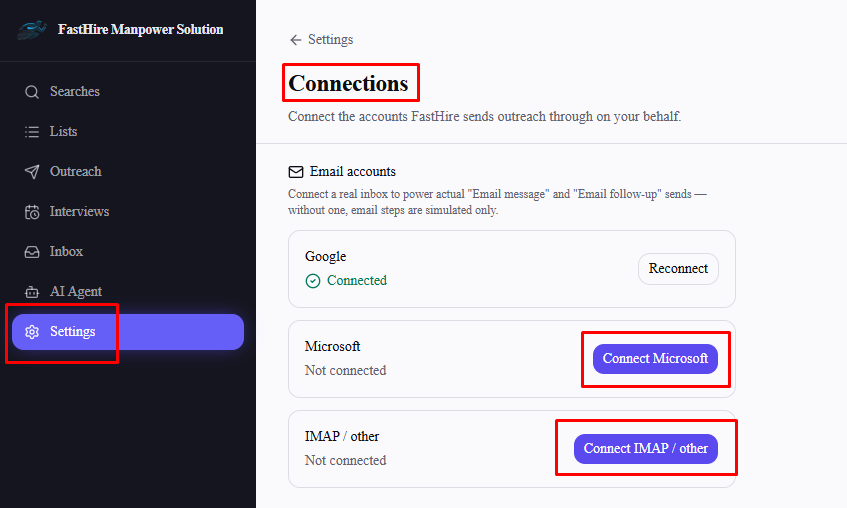
Go to Settings → Connections → Email accounts.
Select Connect Microsoft.
This opens the IMAP/SMTP form below it, already filled in with Microsoft 365's standard server settings (
outlook.office365.comon port 993 for incoming,smtp.office365.comon port 587 for outgoing). Enter your Microsoft 365 email address and password (or an app password, if your organization requires one for IMAP access) and select Test & connect.
This is a direct IMAP/SMTP connection to your Microsoft 365 mailbox, not a Microsoft sign-in screen — FastHire tests both the incoming and outgoing settings before saving anything.
This is a different connection from Microsoft Teams (used for interview calendar/meeting links — see "Connecting Microsoft Teams Calendar for Interview Scheduling") and from signing in to FastHire itself with a Microsoft account. Connecting one has no effect on the other two.
Connecting IMAP (any other provider)
Use this if your mailbox isn't Gmail or Microsoft — a company email hosted elsewhere, for example.
Go to Settings → Connections → Email accounts.
Select Connect IMAP / other.
Enter your mail server's IMAP host/port and SMTP host/port along with your email address and password directly in the form — there's no separate hosted page for this. FastHire tests both before saving, and if the test fails, it now shows you the mail server's actual rejection reason (for example, an authentication failure or an app-password requirement) instead of a generic error.
After connecting
As with any connection type, there can be a short delay before the Connections page shows Connected — it updates once FastHire receives confirmation in the background, not instantly on redirect.
Frequently asked questions
Do I need my IT team's help to connect IMAP?
Only if you don't already know your mail server's host, port, and encryption settings — your IT team or email provider's documentation will have these.
What if my email provider isn't Gmail, Microsoft, or a generic IMAP-compatible service?
If your provider supports IMAP access (most business and personal email services do), use the IMAP / other option with its server settings.
Will email sequence steps stay "simulated" if I skip connecting an email account?
Yes — without one of Gmail, Microsoft, or IMAP connected, email steps are recorded as sent in FastHire without a real email actually going out.
Can I disconnect an email account?
Yes — select Disconnect next to any connected email account (Gmail, Microsoft, or IMAP) in Settings → Connections.