
How to Track Search-to-Interview Conversion Rates
Rakesh · August 5, 2026 · 3 min read
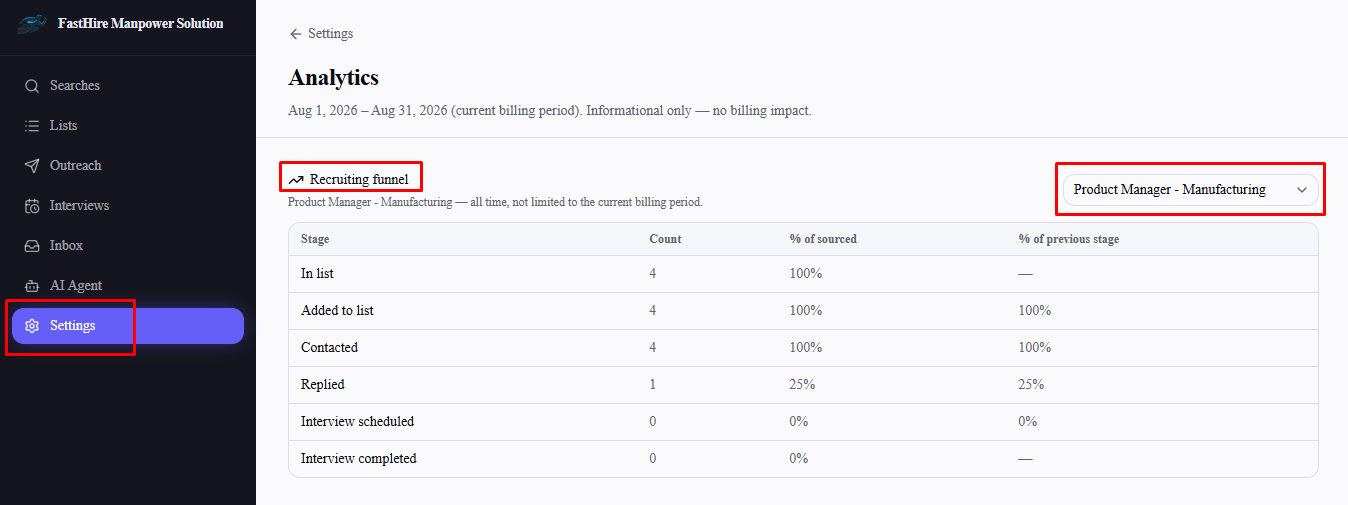
Search-to-interview conversion is just the recruiting funnel's "Interview scheduled" and "Interview completed" rows, read as a percentage of everyone sourced — filtered to the specific list you're hiring for, viewed all-time rather than just the current billing period.
Step 1: Open Analytics and filter to your role's list
Go to Settings → Analytics and use the list filter above the recruiting funnel to select the list tied to the role you're measuring. This matters because the default org-wide funnel only covers candidates sourced in the current billing period — a role you've been hiring for over several weeks needs the all-time view a specific list gives you instead.
Step 2: Read the conversion percentages
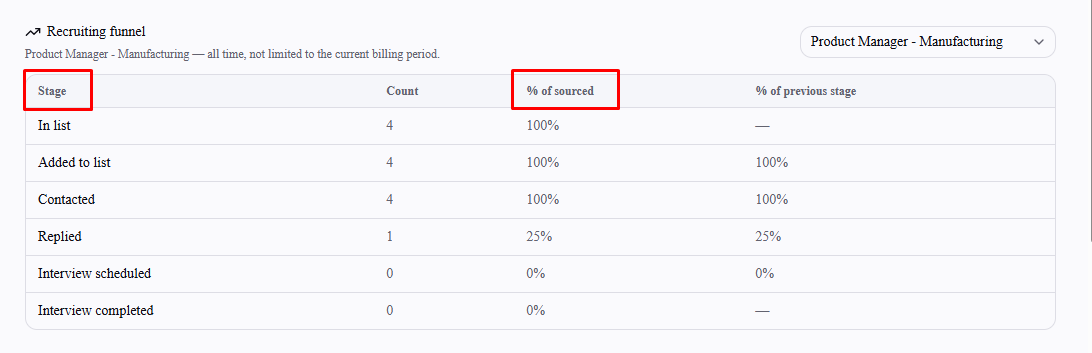
Look at the "% of sourced" column for the Interview scheduled and Interview completed rows — that's your search-to-interview and search-to-completed-interview conversion rate for this specific list. The "% of previous stage" column next to it tells you the drop-off at each individual step instead, if you want to see where candidates are falling out rather than just the end-to-end rate.
Step 3: Check the cost side alongside it
The Credit cost efficiency section further down the same page shows Cost / interview — but note this figure is org-wide for the current billing period, not scoped to your selected list, so treat it as a general benchmark rather than a per-role cost.
Frequently asked questions
Why is the org-wide funnel not useful for a role I've been hiring for a while?
It's scoped to the current billing period only, so candidates sourced before this period started won't show up in it at all — filter to that role's specific list to see the complete picture regardless of when sourcing happened.
What if I haven't saved candidates for this role to a list yet?
The list filter only offers lists that already exist — save the role's candidates to a list first (see "How to Save Candidates to a List") if you haven't already.
Is "Interview completed" the same as a candidate accepting an offer?
No — it only reflects that the interview itself was marked completed in FastHire, not the outcome of that interview or any later hiring decision.
Does this update in real time as I schedule and complete interviews?
Yes — Analytics reflects current data each time you load the page, not a cached or delayed snapshot.