
How to Calibrate AI Search Results? (Accepting and Rejecting Matches)
Rakesh · August 5, 2026 · 3 min read
Calibration is where you teach a new AI agent your specific judgment before it scores real candidates. You'll review a small set of sample profiles against your search's mandatory and desirable criteria, marking each one a valid match or not — and this log becomes a real input into how every future candidate for that search gets scored, not just a one-off onboarding exercise.
When calibration happens
It's part of setting up an AI agent for a search, right after criteria are proposed (see "Setting Mandatory vs. Desirable Criteria in a Search"). You'll review three sample candidates, one at a time, before moving on to configure and start the actual run.
Step 1: Read the AI's case for each candidate
Each candidate card comes with a written justification — a short paragraph explaining how well they match your mandatory and desirable criteria, referencing specific criteria by name and being upfront about any gaps rather than glossing over them.
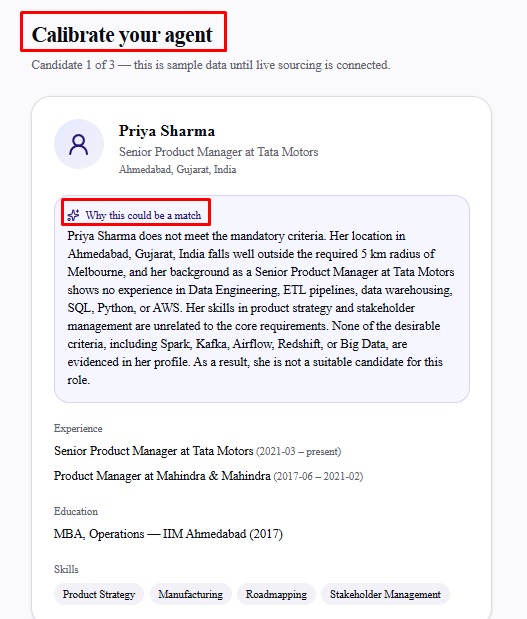
Step 2: Mark them a valid match or not
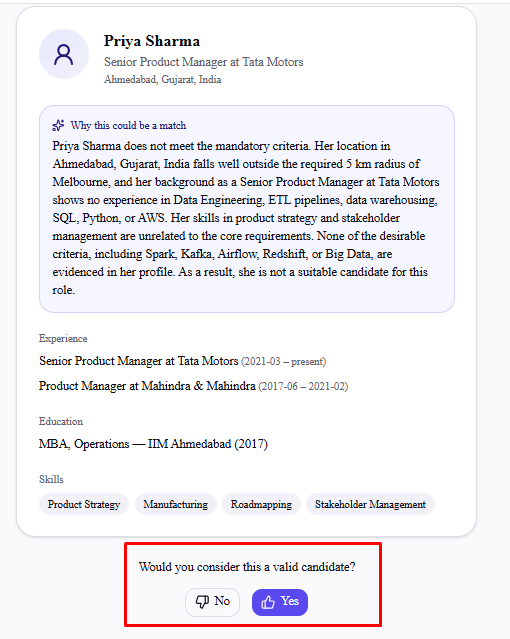
Answer "Would you consider this a valid candidate?":
Select Yes to accept them as a valid match and move to the next candidate.
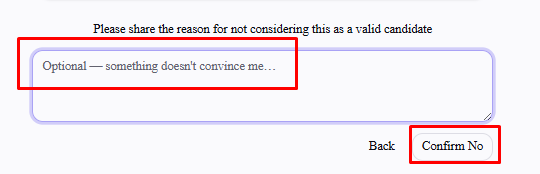
Select No to reject them — you'll be prompted for an optional reason before confirming.
The reason field is optional, but worth filling in — a specific reason ("missing the required certification" rather than nothing at all) gives the AI more to learn from than a bare rejection.
There's no way to skip a candidate — you respond to all three before continuing. Once you've responded to the last one, you move straight into configuring the run.
What your answers actually do
Your yes/no responses and reasons are saved as the agent's calibration log and passed to the AI on every scoring run for that search — not just the first one. It's used alongside your mandatory and desirable criteria to judge real sourced candidates, so a rejection with a clear, specific reason genuinely sharpens how the agent scores similar candidates later. A vague or rushed calibration pass has the opposite effect.
These sample profiles are stand-ins used purely to calibrate — they aren't candidates from your actual search, and they won't appear anywhere in your real results.
Frequently asked questions
Can I redo calibration later?
If you've already calibrated an agent for this search, revisiting setup reuses that same criteria and calibration log automatically rather than asking you to calibrate again — you'll land on the "Configure your agent run" screen with a note that it's using your previous calibration. Select Recalibrate instead there if you want to go through calibration fresh.
Does calibration affect candidates I've already scored?
No — it shapes how the agent scores candidates going forward, not results you already have. Run the agent again if you want existing results reconsidered under updated calibration.
What if I disagree with the AI's justification for a candidate?
Answer based on your own judgment, not the AI's framing — that's the entire point of calibration. If the justification undersells or oversells a candidate, your Yes/No and reason are what actually get recorded.
Does Autopilot mode go through this same manual calibration?
No — Autopilot has the AI generate its own calibration verdicts to stand in for a human reviewer, since that mode is designed to run without you clicking through each step. Manual calibration only happens when you set up an agent yourself.